HEIC to JPG Converter Batch Convert iPhone Photos to High-Quality JPEG on Windows 10 & 11 PC
The ultimate desktop software to securely batch convert Apple HEIC photos to JPG format right on your Windows PC. No internet required, no file limits, zero quality loss.
Download for Windows (Free)
Version 2.4 | Windows 10 & 11 Compatible
The Best Offline HEIC to JPG Converter for PC
Designed for speed, privacy, and flawless conversion quality without relying on cloud servers.
If you recently transferred photos from your iPhone to your Windows computer, you likely encountered the frustrating HEIC file format. While Apple utilizes this high-efficiency image container to save storage space on iOS devices, Windows ecosystems and many legacy applications struggle to open or view these images natively. This is exactly where a dedicated HEIC to JPG Converter becomes essential for PC users.
Why Choose a Desktop Tool Over Web Converters?
When searching for a way to convert HEIC to JPG, you will find dozens of free online tools. However, using cloud-based services introduces massive privacy risks. Uploading your personal family photos, sensitive documents, or private memories to an unknown server is never recommended. Furthermore, online converters usually impose strict limits on file sizes or restrict you to converting only five photos a day. Our offline software completely eliminates these issues. Because it is installed locally on your machine, your photos never leave your hard drive. It is 100% secure, private, and works flawlessly without an internet connection.
Blazing Fast Batch Processing
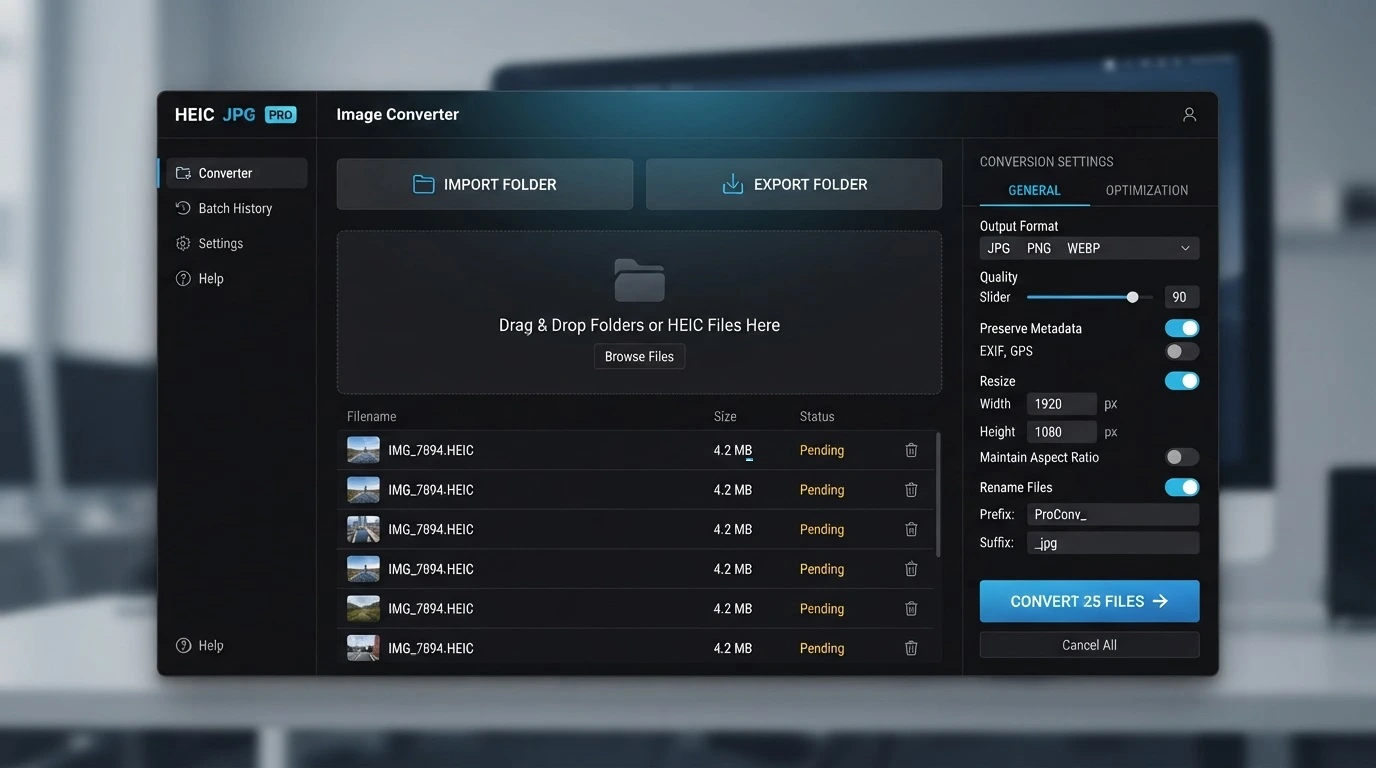
If you have just returned from a vacation with a folder containing hundreds or even thousands of Apple images, converting them one by one is simply impossible. Our advanced batch HEIC to JPG technology allows you to drag and drop entire directories into the interface. With a single click, the software utilizes multi-threading to process massive amounts of data instantly. You can convert thousands of images into standard JPEG format in just a matter of seconds, saving you hours of tedious manual work.
Retain EXIF Metadata and 100% Original Quality
A major concern when you convert HEIC to JPG is losing the precious metadata attached to your pictures. Our robust utility is engineered to preserve all original EXIF data. The location coordinates, camera model, date taken, and time stamps remain completely untouched during the conversion process. Additionally, the algorithm guarantees zero quality loss. You get the exact visual fidelity of the original Apple photo, but in a universally accessible format that can be easily shared, uploaded to social media, or edited in Adobe Photoshop.
Software Specifications
| Software Name | HEIC to JPG Converter Pro |
|---|---|
| Supported OS | Windows 11, Windows 10, Windows 8, Windows 7 (32-bit & 64-bit) |
| License Type | Freeware (0 USD) |
| Privacy & Security | 100% Offline Processing (No cloud uploads, absolute privacy) |
| Key Features | Batch Conversion, EXIF Preservation, Lossless Quality Output |
How to Convert HEIC to JPG on Windows
A simple 3-step process to batch convert your files.
Download and Install
Download the HEIC to JPG Converter Pro and install it safely on your Windows 10 or 11 PC.
Import HEIC Files
Drag and drop your HEIC photos or entire folders directly into the software interface.
Convert to JPG
Select JPG as your output format, optionally adjust the image quality, and click the Convert button.
Trusted by over 1,420+ Users
See why PC users rate our converter 4.9/5 stars.
"I had over 2,000 photos from my iPhone that I couldn't open on my Windows 11 PC. This software converted the entire folder in less than 2 minutes. Absolutely brilliant and super easy to use!"
"I love that it works offline. I didn't want to upload pictures of my kids to some random website just to convert them. Everything stays on my computer, and the quality is flawless."
"It keeps the EXIF data intact! Finally a converter that doesn't strip the date and location info from my photography. Highly recommend this for batch processing."
Frequently Asked Questions
What is a HEIC file?
HEIC (High-Efficiency Image Container) is a format used by Apple for iOS devices to save photos in high quality while taking up less space. However, it is not natively supported by all Windows applications.
How do I convert HEIC to JPG on Windows?
Simply download our HEIC to JPG Converter, open the software, drag and drop your HEIC files into the interface, choose JPG as the output format, and click convert.
Can I batch convert HEIC to JPG files?
Yes, our software is designed specifically for batch conversion. You can add entire folders containing thousands of photos and convert them all simultaneously.
Is my privacy protected during conversion?
Absolutely. Unlike online converters, this is a desktop utility. All conversions happen locally on your PC, meaning your private photos are never uploaded to the internet or any third-party servers.
Will the EXIF data be preserved?
Yes, our HEIC to JPG Converter retains all original EXIF metadata, including the date, time, and camera settings of your original photos.
Does the conversion process reduce photo quality?
No. The software allows you to adjust the output quality. By default, it is set to maintain 100% of the original visual quality of the HEIC image.
Is this software compatible with Windows 11?
Yes, the tool is fully optimized for both Windows 11 and Windows 10, running natively without requiring extra codecs.
Do I need an internet connection to use the software?
No internet connection is required after the initial download. The software works completely offline.
Are there any file size limits?
Because the processing utilizes your computer's hardware, there are absolutely no file size limits or daily conversion restrictions.
How fast is the conversion process?
The conversion is practically instantaneous. Depending on your PC's CPU, you can convert hundreds of HEIC photos into JPG format in just a few seconds.
